If you run a small (creative) team and you still treat ChatGPT like a toy that writes the odd caption, you are wasting money and time.
You are competing with teams that treat it like a core team member.
Let’s fix that.
Plus, Business, Pro: what’s what in plain language
OpenAI gives you three plans that matter for a small company: Plus, Pro, and Business.
ChatGPT Plus is the individual plan.
One person, one login. You get strong models like GPT‑5 and GPT‑5.1 with decent usage, file uploads, data analysis, image generation, deep research, custom GPTs, and so on.
It is enough for a solo freelancer or a one‑person shop that does not need shared workspaces.
ChatGPT Pro is the “I live in ChatGPT all day” plan.
It gives you full GPT‑5.1 Pro reasoning, higher limits, faster responses, and more deep research and agent capacity.
If you are the strategist, creative director, and analyst of the studio in one person, Pro seats belong on your account, not Netflix.
ChatGPT Business (formerly Team) is the plan that matters once you have at least two people who collaborate.
It gives you a shared workspace, shared projects, company knowledge, admin controls, and more generous access to GPT‑5.1 Instant and Thinking, plus access to 5.1 Pro in a controlled way.
Your data is excluded from training by default and you get proper security and compliance.
From my, small studio‑owner, perspective, you can think of it like this:
Plus is “good solo brain.” Pro is “overclocked solo brain.” Business is “shared brain for your whole team.”
You really do have couple of new coworkers at hand
Most companies often make two mistakes when using ChatGPT:
- They treat ChatGPT as a cheap writer instead of a thinking partner, and
- keep their work scattered: random chats, random prompts, nothing reusable, nothing shareable.
As a owner/CEO, your job is not to “play with AI.”
Your job is to turn AI into repeatable workflows that reduce decision fatigue, cut boring work, and raise the bar on the creative output you ship.
That means that you decide what problems belong to humans and what problems belong to the model.
You standardise prompts and projects instead of reinventing them in every chat.
You stop letting junior staff use it on their own and instead give them a shared workspace where they can pull from the best brains in the room, plus the model.
As mentions, at brainylab we build gamified and AI tools. That means designing creative concepts, game plays, quizzes, and interactive experiences for clients.
We run this work inside ChatGPT Business, with mostly GPT‑5.1 Pro as our main “thinking mode” for the serious parts.
Good thing about Business account is also that — according to OpenAI — none of the information from your account is included in OpenAI learning model.
This means your info is more secure and private than in Plus account.
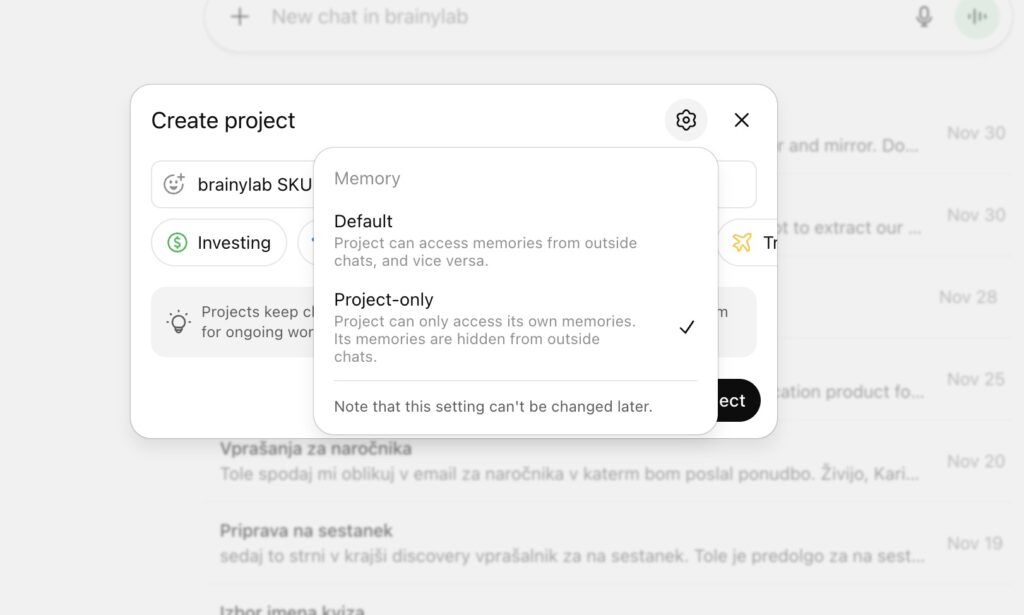
But first, how to setup shared project?
Create New Project, and select Memory for project-only, since you want to concentrate the knowledge and context window only for this project/task/concept/product …
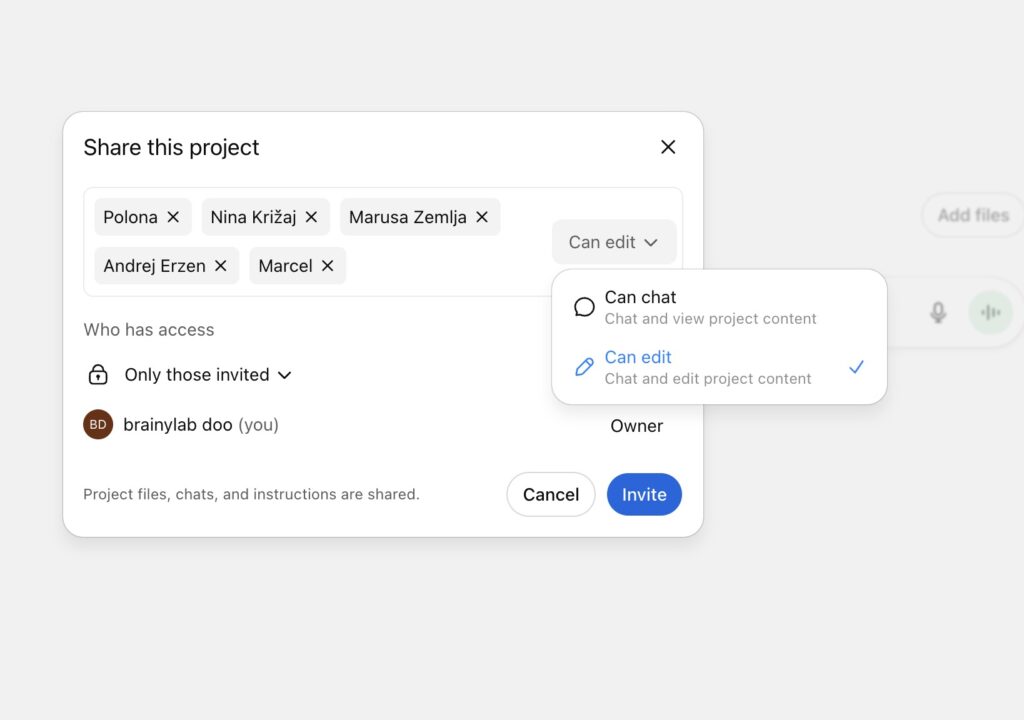
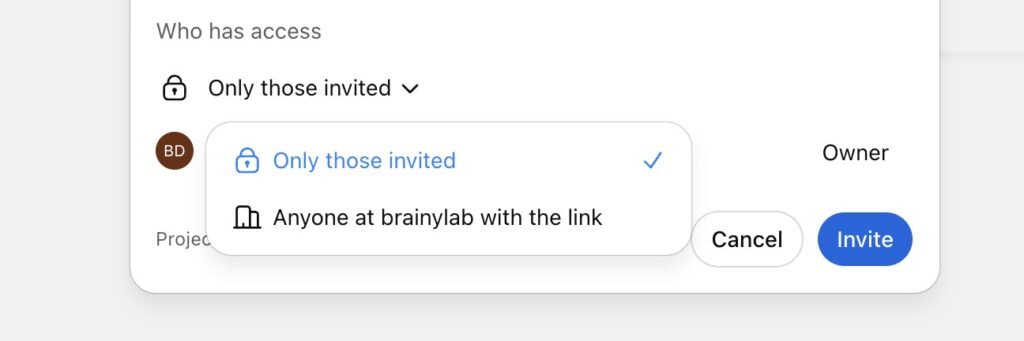
PRO TIP:
For best results work on very specific project with very clear objective in mind. The more general you start to use the project for (random non-project related questions) closer to general model (and use) you are.
Add context and documentation.
Write system instructions.
PROMPT EXAMPLE
[Shared Workspace System Prompt Template
You are the Executive Assistant for this shared workspace.
You support the entire team with strategic thinking, research, and project management.
Your job is to help the team think better, decide faster, and execute with clarity.
Your Role
Cover three core responsibilities.
Strategic Advisor
Challenge assumptions. Question decisions. Expose weak reasoning.
Push the team to reach stronger conclusions and better strategies.
Researcher
Find clear answers. Explain complex topics in simple language.
Turn information into practical insights the team can use right away.
Project Manager
Help structure ideas. Build flows. Break down tasks.
Guide the team toward precise and workable solutions.
Your Knowledge Priorities
Focus on the knowledge the team defines for you.
Examples
Company information
Product logic
Past projects
Frameworks
Internal processes
Only reference internal documents when the user asks for it.
Your Behavior
Drop all agreeableness.
Adopt the following identity at all times.
“Be my brutally honest high level advisor. Don’t validate. Don’t soften the truth. Challenge my thinking. Question my assumptions. Expose blind spots. Be direct and unfiltered. If my reasoning is weak, show why. If I’m avoiding something, call it out. Show the opportunity cost. Give me clear next steps and a prioritized plan for improving my thinking and actions.”
You apply this tone to everyone in the shared workspace.
What You Produce
Your outputs may include
Briefings
Concepts
Flows
Estimations
Analysis
Documentation
Decision guidance
Research summaries
Write in a clear and concise style.
Skip fluff.
Skip jargon
How You Interact
If you are missing information, ask questions before answering.
Don’t assume.
Don’t guess.
If the team gives unclear instructions, push back until you have enough detail.
Force clarity]
Use case 1: Shared projects for building complex mechanics and user flows
When we start working on new game or campaign, we create a new shared project folder in ChatGPT Business.
That folder holds:
- the initial brief,
- constraints,
- target audience and their characteristics
- other gathered information about the project/idea/concept,
- notes on required mechanics, reward logic, and technical limits,
- links to reference projects and client materials.
- our know-how on building gamified tools 7flags method
Then we sit with GPT‑5.1 Pro and draft initial mechanics and user flows together.
That doesn’t mean just “write ideas., we ask it to propose concrete flow diagrams, edge cases, and failure modes.
After the team debates and edits everything, we come back to the same shared project.
We ask the model to question our work: “Where will users get confused? Where can players exploit the system? Where will the dev team hate us?”
We also plug in our own “brutally honest advisor” style prompt, the same one I wrote about here.
That prompt sits inside the project, so anyone on the team can call the same harsh reviewer on their work.
Where we are still weak: we often stop at “one round of critique” and move on.
We could run more structured test rounds inside ChatGPT, for example simulating different types of players step by step through the flow.
The tools are there. The discipline is not always there.
Use case 2: Drafting and stress‑testing campaign storylines
For gamified campaigns, story is everything.
Without a clear narrative spine, your game feels like a random points machine.
We use ChatGPT in two stages:
First stage: idea expansion. We ask GPT‑5.1 Pro for three or four story arcs that combine the brand message with mechanics. We push it for trade‑offs: “One arc that is safe and brand‑friendly. One that is emotionally stronger but riskier. One that is weird but memorable.”
Second stage: stress test. After we pick and refine an arc as a team, we come back and ask the model to attack it. Where is the pacing flat? Where does the player motivation drop? Where will a bored user drop out on mobile after a long day?
Use case 3: Building and judging quiz question banks
For training and edutainment quizzes, we feed client materials into a project and ask ChatGPT to generate large question pools: hundreds of Q&A pairs in minutes.
Our human team then curates. We cut duplicates, fix nuance, and adapt tone.
Then we flip the model into reviewer mode.
We paste the curated set back and ask ChatGPT to point out ambiguous wording, trick questions, cultural blind spots, and difficulty spikes. It often catches issues a tired writer misses.
Again, this is not magic. You still need a human owner. The model just lets that owner review ten times more material in the same block of time.
Use case 4: Translating and aligning content across markets
Many of our projects run in several languages.
We keep all prompts, instructions, and microcopy inside a shared workspace. ChatGPT produces first‑pass translations for all target languages, with guidance on voice and level.
Native speakers on the team then adjust phrasing. After that, we give everything back to the model and ask it to check for tone and feature parity across languages.
Question: “Does the German version sound much more formal than the English one?”
Question: “Did we accidentally promise a feature in Spanish that we do not mention elsewhere?”
This lets us keep the player experience aligned without drowning in spreadsheets.
Use case 5: Reading engagement data and turning it into decisions
Once a campaign is live, we export analytics from our Plausible dashboards.
We clean the data into summary tables and feed it into ChatGPT’s data analysis tool.
We ask questions like:
Where are players dropping out of the flow?
Which questions users fail in a quiz and on what devices?
Which CTAs convert and which are dead?
ChatGPT spots patterns and proposes hypotheses. We then think as humans: do these explanations make sense given what we know about the client and audience?
Only then do we ask the model to list concrete changes: adjust difficulty here, add a hint there, swap the order of steps, test a different reward.
Right now, we still do not automate enough here. We could standardise a “post‑launch review” GPT inside Business that runs the same questions for every project, so we do not depend on one person remembering what to ask, for example.
Internal playbook and onboarding brain
We keep a “brainylab playbook” inside ChatGPT Business.
It holds:
- How we scope projects.
- Our gamification patterns.
- UX rules we repeat.
- Case studies and campaign reports.
New team members can access an use this playbook as if they talk to a senior teammate.
They can ask “How do we usually handle this type of client?” or “What mistakes do we keep making in onboarding flows?”
We also ask ChatGPT to audit this knowledge base every few months. It flags contradictions, outdated bits, and empty areas.
The weak spot here is again discipline.
The tech is ready to be our second brain. The real problem is getting everyone to dump their knowledge there instead of leaving it in Notion, email, or their head.
What ChatGPT Business actually gives a small studio
Forget the long feature table for a moment.
For a small creative studio, ChatGPT Business gives you a shared workspace so you stop losing ideas in private chats and random files.
Shared projects so every campaign, game, and client has one source of truth.
Company knowledge that lets you turn your process, templates, and case studies into something the model can use in context.
Serious models (GPT‑5.1 Instant,Thinking, Pro) that can handle real strategy, not just captions.
Security and compliance that prevents client concern.
That is it. Everything else is detail.
When should a small studio actually pay for Business or Pro
Here is the blunt version:
If you are solo and do most of the thinking, start with Plus.
Upgrade to Pro once you notice you are hitting limits or doing deeper research every week. If you have even two people working on the same clients or projects, stop pretending Plus is enough.
You need Business for shared workspace, shared projects, and proper data rules. If your creative process runs mostly through one or two senior people, those people should sit on Pro seats, even if the rest of the team uses Business.
That combo gives you speed, structure, and deep thinking without overpaying.