When you build with large language models, you’re charged by the token and limited by a model’s context window.
A token isn’t a word; it’s a tiny chunk of text understood by the model. Not understanding how token counts works, can lead to higher API costs or unexpected truncation.
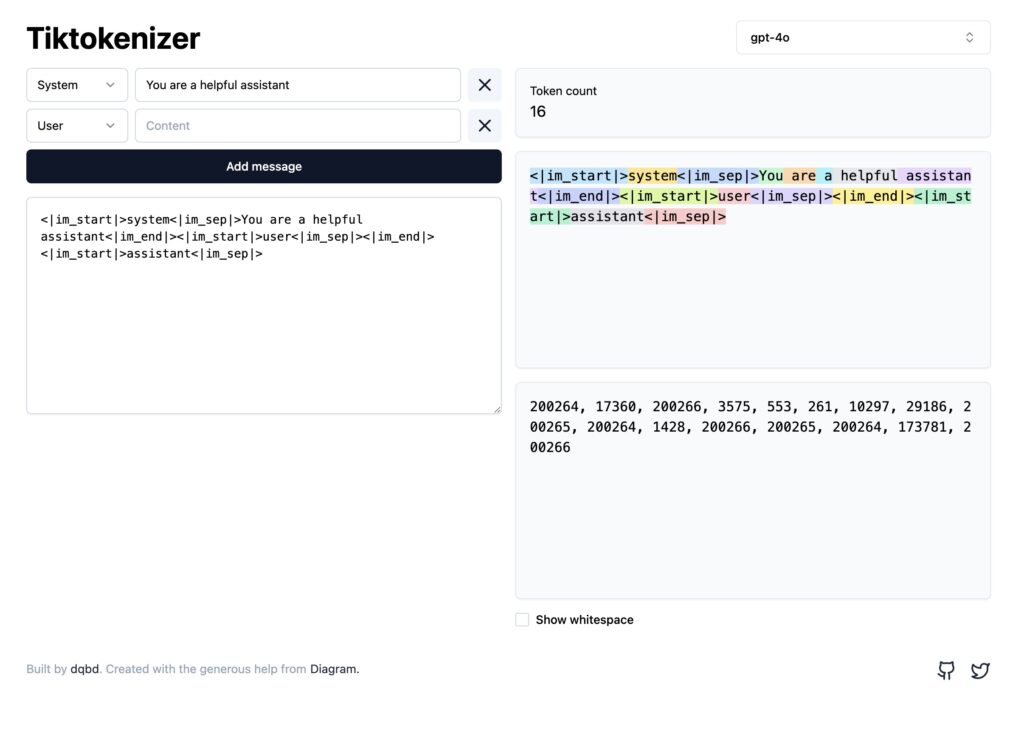
Tiktokenizer is a free web tool that lets you see exactly how your text is split into tokens. You can paste system, user and assistant messages, pick the model you’re targeting (GPT‑4, GPT‑4o, Claude, Llama and others) and instantly see:
- A running total of tokens used in the conversation.
- A colour‑coded breakdown showing how each part of your prompt is tokenized.
- The numeric IDs of each token, which can help when debugging integration issues.
Why token visibility matters for your projects?
Budget awareness
Providers bill by the token usage. Understanding how text is tokenized helps you reduce unnecessary tokens and lower API costs.
Context management
Each model has a maximum token limit. Tiktokenizer reveals how close your prompt is to that limit so you can avoid truncation.
Prompt engineering
Small changes in wording or spacing can change token counts. Visualizing tokenization encourages experimentation and leads to more efficient prompts.
For teams working on AI products, adopting Tiktokenizer as part of the prompt‑design workflow can save money and reduce headaches.